Public Wi-Fi Security Tips : Stay Safe on the Go
Picture this: You're sitting in a cozy coffee shop, sipping your latte, and connecting to their free Wi-Fi to check your email or catch up on work. It feels productive, convenient, and harmless.
But here's the uncomfortable truth: that free Wi-Fi network could be a goldmine for hackers. Every time you connect to an unsecured public network, you could be handing over your passwords, personal data, and even your identity to cybercriminals.
The good news? You don't need to be a tech wizard to protect yourself. With a few simple habits, you can stay safe and enjoy the convenience of public Wi-Fi without the risk.
This guide will walk you through the risks of public Wi-Fi and, more importantly, the simple steps you can take to protect your data.
Why Is Public Wi-Fi So Risky?
Public Wi-Fi networks are inherently less secure than your private home or office network. Here’s why:
1. Unencrypted Networks
Many public Wi-Fi networks don't encrypt the data sent between your device and the router. This means any information you send—passwords, emails, credit card numbers—can be intercepted by anyone else on the same network using readily available tools.
2. Man-in-the-Middle (MitM) Attacks
Hackers can position themselves between your device and the Wi-Fi connection point, intercepting all the data you're sending and receiving. You think you're talking to the bank's website; in reality, you're talking to the hacker, who is relaying your information.
3. Malicious "Evil Twin" Networks
Attackers can set up a fake Wi-Fi network that looks legitimate, like "CoffeeShop_Free_WiFi" or "Airport_Free_WiFi." When you connect to it, you're connecting directly to the hacker's device, and they can see everything you do.
4. Malware Distribution
Unsecured networks can be used to push malware onto your device, especially if you have file sharing or network discovery turned on.
5. Session Hijacking
If you're logged into a website or application, hackers can steal your session cookies and impersonate you without needing your password.
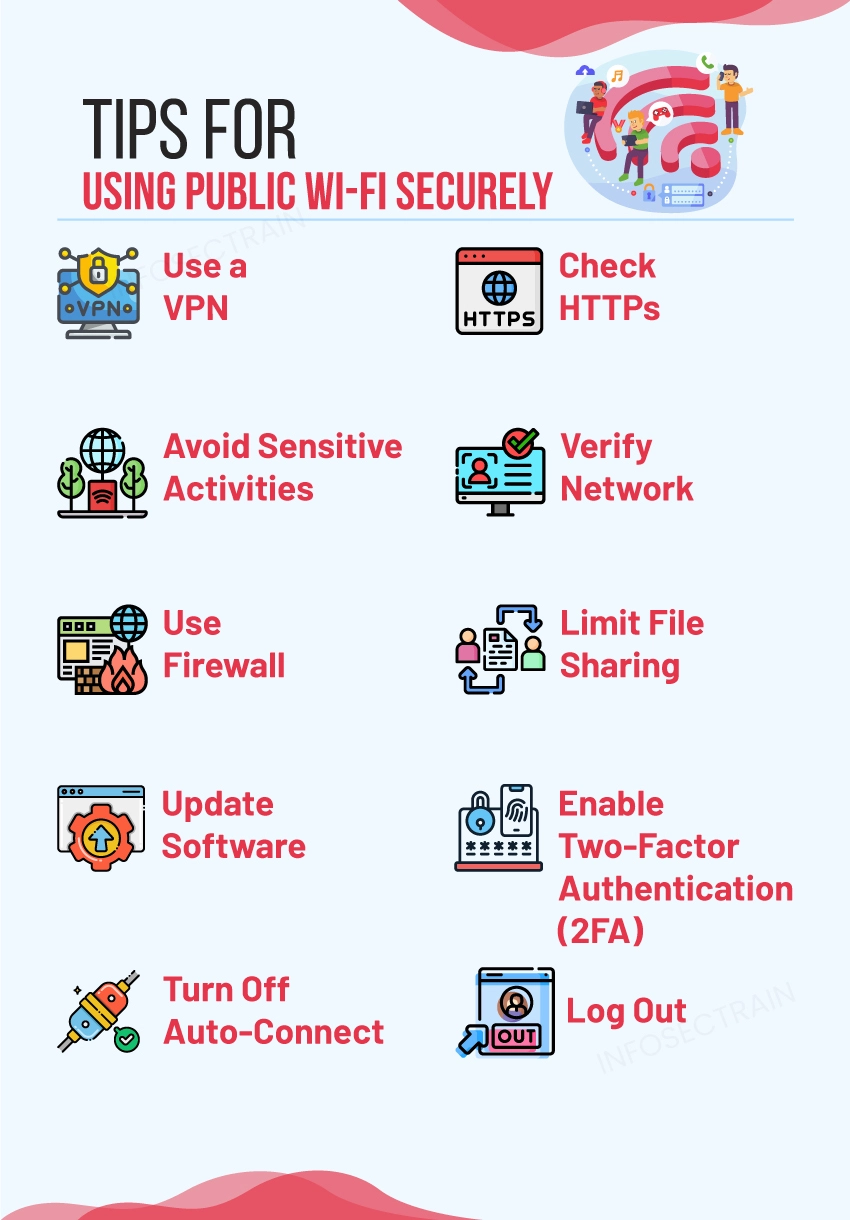
How to Stay Safe on Public Wi-Fi: 7 Essential Tips
1. Use a VPN (Virtual Private Network) — Your First Line of Defense
A VPN creates an encrypted tunnel for your data, making it unreadable to anyone snooping on the network.
Why it works:
-
Even if a hacker intercepts your data, they only see encrypted gibberish.
-
Your IP address is hidden, adding an extra layer of privacy.
Pro Tip: Choose a reputable VPN service with a strict no-logs policy. Avoid free VPNs that may sell your data to third parties. If you're a business user, ensure you use a corporate-approved VPN solution.
2. Verify the Network Name — The "Evil Twin" Defense
Always confirm the official Wi-Fi network name with an employee at the location. Hackers often create fake networks with similar names to trick you.
What to do:
-
Ask staff: "What is your official Wi-Fi network name?"
-
Look for official signage in the café, hotel, or airport.
-
Avoid connecting to networks with generic names like "Free Wi-Fi" or "Public Wi-Fi" unless you're absolutely sure.
3. Turn Off Sharing and AirDrop
When you're on a public network, you don't want other devices to see your computer, and you certainly don't want them to access your files.
What to do:
-
Windows: Go to Network Settings and turn off "Network Discovery" and "File and Printer Sharing."
-
macOS: Go to System Settings > Sharing and uncheck all services like "File Sharing," "Screen Sharing," and "AirDrop."
-
Mobile: Disable file sharing and "Nearby Share" or "Quick Share" features.
4. Enable "Ask to Join" or Disable Auto-Join
Your device might automatically connect to networks it recognizes. This is convenient, but it can be a risk if a hacker sets up a network with a name your device has connected to before.
What to do:
-
iOS/Android: Turn off the "Auto-Join" feature for public networks and enable "Ask to Join" so you can manually approve each connection.
-
Laptops: In your Wi-Fi settings, turn off "Connect automatically" for networks that aren't your trusted home or office.
5. Force HTTPS (Use Browser Extensions)
HTTPS (the "S" stands for "Secure") encrypts communication between your browser and the websites you visit. However, not all websites use it by default.
What to do:
-
Install the HTTPS Everywhere browser extension (from the Electronic Frontier Foundation). It forces websites to use the encrypted HTTPS connection whenever possible.
-
Also, look for the padlock icon in your browser's address bar before entering any sensitive information.
6. Use Two-Factor Authentication (2FA) Everywhere
Public Wi-Fi exposure can sometimes lead to compromised passwords. Two-factor authentication acts as a lifeboat: even if a hacker gets your password, they can't access your accounts without the second factor (e.g., a code from an authenticator app or a text message).
What to do:
-
Activate 2FA on every account that offers it, especially for email, banking, and social media.
-
Avoid using SMS text messages for 2FA if possible—use a dedicated authenticator app (like Google Authenticator or Authy) for better security.
7. Forget the Network When You're Done
Once you leave the coffee shop, your device might still remember the network and try to auto-connect in the future.
What to do:
-
As soon as you're done using a public Wi-Fi network, "forget" it in your device's Wi-Fi settings. This prevents your device from automatically reconnecting to potentially malicious clones later.
Quick Checklist: Before You Connect
| Action | Done? |
|---|---|
| Connected to my VPN? | ☐ |
| Verified the official network name with staff? | ☐ |
| Turned off file sharing and device discovery? | ☐ |
| Disabled auto-join for this network? | ☐ |
| HTTPS Everywhere extension is active? | ☐ |
| Sensitive apps (banking) are closed? | ☐ |
The Golden Rule: If It's Sensitive, Don't Do It on Public Wi-Fi
This is the simplest and most effective rule: Don't do sensitive stuff on public Wi-Fi.
-
Avoid banking or accessing financial accounts.
-
Don't shop online and enter your credit card information.
-
Don't log in to your primary email or anything that contains highly sensitive personal data.
Save those activities for when you're on a trusted, secured network, like your home Wi-Fi or a cellular hotspot. It's not worth the risk.
Final Thoughts: Stay Safe, Stay Smart
Public Wi-Fi is a fantastic convenience that modern life offers us. You can work from anywhere, stay in touch, and look up information on the go. Just remember that with great convenience comes a great need for caution.
By following these simple practices—especially using a VPN, turning off sharing, and being picky about which networks you connect to—you can significantly reduce your risk.
The digital world is full of opportunities, but also full of criminals looking for easy targets. Don't be one of them.
Do you have any tips for staying safe on public Wi-Fi? Share them in the comments below—your advice might help someone else avoid a nasty surprise.
Quick Summary (TL;DR)
| Why Public Wi-Fi Is Risky | Unencrypted networks, MitM attacks, evil twin networks, malware distribution, session hijacking. |
|---|---|
| Top Tips | Use a VPN, verify the network name, turn off sharing and AirDrop, disable auto-join, force HTTPS with browser extensions, use 2FA, and forget the network when done. |
| The Golden Rule | Avoid sensitive activities (banking, shopping, primary email) on public Wi-Fi. |
| Quick Wins | A VPN protects everything; 2FA protects your accounts even if passwords are stolen; HTTPS Everywhere encrypts your web traffic. |
| Mindset |
Public Wi-Fi is a public space—treat it like one. Don't leave your personal data lying around. |
Contact Us
Phone: +91 9667708830
Email: info@codingnow.in
Website: https://codingnowai.in/
Address:
2nd Floor, Kapil Vihar (Opp. Metro Pillar No.354)
Pitampura, New Delhi – 110034
Backlink to main website: Explore Python and AI courses at Coding Now – Gurukul of AI