Kubernetes Basics: Your Guide to Container Orchestration
Imagine you're managing hundreds of shipping containers at a busy port. You need to load them onto the right ships, make sure they're balanced, replace damaged ones, and scale up when more cargo arrives. Doing all of that manually would be chaos.
Kubernetes solves this exact problem—but for software containers. It's like a super-smart port authority that automates the deployment, scaling, and management of containerized applications.
What Is Kubernetes?
Kubernetes (often shortened to K8s) is an open-source platform that manages containerized workloads and services. It handles the heavy lifting of running containers in production—no matter how many you have.
The name comes from Greek, meaning "helmsman" or "pilot". And that's exactly what it does: it steers your applications through the rough waters of production environments.
Why Do We Need Kubernetes?
Containers transformed how we build and ship software—they're lightweight, portable, and consistent across environments. But managing containers at scale? That's a whole different story.
The Challenge of Manual Container Management
Without Kubernetes, you'd need to:
-
Manually restart failed containers
-
Figure out which server can handle new containers
-
Balance traffic across containers
-
Update applications without downtime
-
Secure and manage configuration secrets
Kubernetes handles all of this automatically.
What Can Kubernetes Do for You?
1. Self-Healing
Kubernetes restarts containers that fail, replaces ones that don't respond to health checks, and keeps your application running.
2. Automated Rollouts and Rollbacks
Update your application without downtime. If something goes wrong, Kubernetes can automatically roll back to the previous version.
3. Service Discovery and Load Balancing
Kubernetes gives each container its own IP address and can distribute traffic across them automatically.
4. Horizontal Scaling
Scale your application up or down with a simple command or automatically based on CPU usage.
5. Secret and Configuration Management
Store sensitive information like passwords and OAuth tokens securely—without exposing them in configuration files.
6. Storage Orchestration
Automatically mount storage from various sources—local, cloud providers, or network storage systems.
7. Automatic Resource Allocation
Kubernetes figures out the best way to place containers based on their resource needs, optimizing hardware usage.
What Kubernetes Is NOT
Kubernetes is not a traditional Platform-as-a-Service (PaaS) system:
-
It doesn't build your applications—CI/CD workflows are separate
-
It doesn't include middleware or databases out of the box
-
It doesn't dictate your logging, monitoring, or alerting solutions
-
It doesn't limit the types of applications you can run
Kubernetes Architecture: How It Works
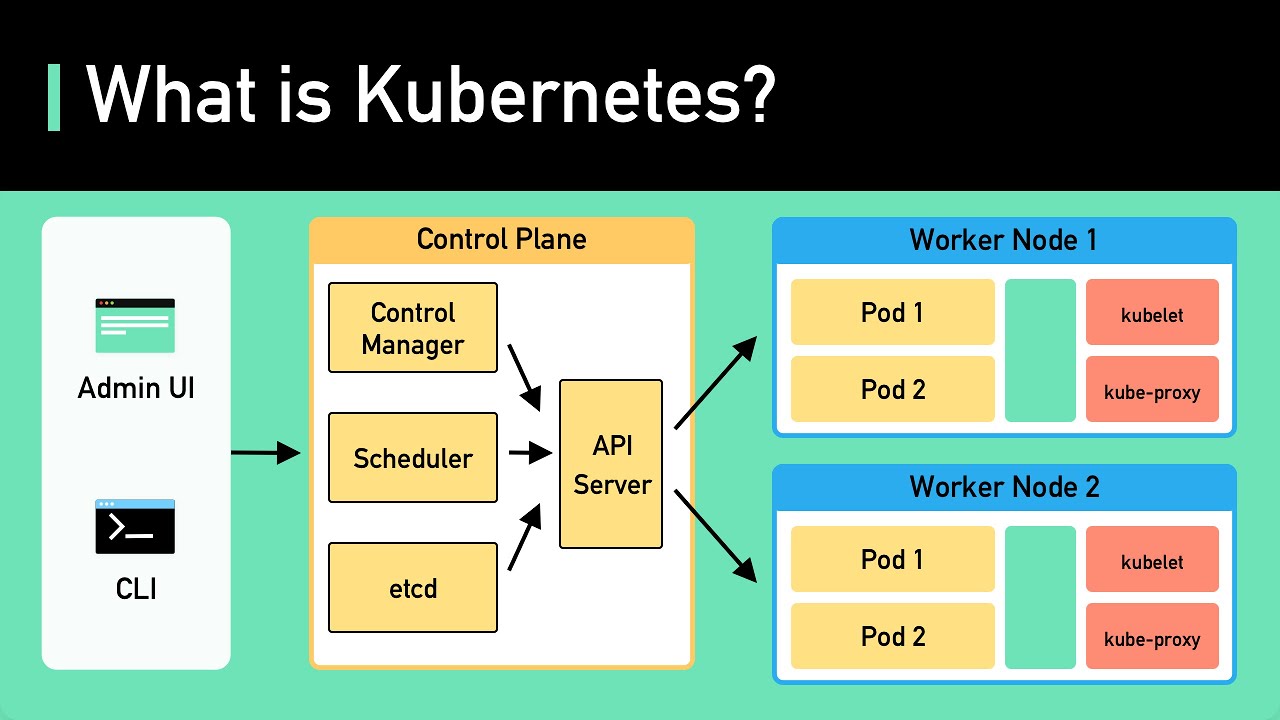
Think of a Kubernetes cluster like a small city, with a central government (the control plane) and individual residents (the worker nodes).
The Control Plane (The "Government")
The control plane manages the entire cluster. It's responsible for making global decisions and detecting and responding to cluster events.
kube-apiserver
The front door to Kubernetes. It exposes the Kubernetes API and handles all requests. Everything communicates through the API server.
etcd
A consistent, highly available key-value store that acts as Kubernetes' database, storing all cluster data—configuration, status, and secrets.
kube-scheduler
Looks for newly created pods that haven't been assigned to a node and picks the best node for them to run on.
kube-controller-manager
Runs controller processes that watch the cluster state and make changes to reach the desired state. For example, if a pod fails, the Node controller notices and responds.
Worker Nodes (The "Residents")
Worker nodes are the machines that actually run your applications.
kubelet
An agent running on every node that ensures containers are running in a pod. It talks to the API server to understand what it should run and reports back on health.
kube-proxy
A network proxy that maintains network rules on each node, allowing pods to communicate with each other.
Container Runtime
The software that actually runs the containers—like containerd or CRI-O.
Core Kubernetes Objects
Pods (The Smallest Unit)
A pod is the smallest deployable unit in Kubernetes. It represents one or more containers that share storage, network, and a specification for how to run. Pods are ephemeral—they can die and be replaced.
Example Pod manifest:
apiVersion: v1
kind: Pod
metadata:
  name: nginx-pod
  labels:
    app: frontend
spec:
  containers:
  - name: nginx
    image: nginx:latest
    ports:
    - containerPort: 80
Deployments (Manage Stateless Apps)
Deployments provide declarative updates for pods and replica sets. They're the recommended way to manage stateless applications. You can roll out new versions, pause, or roll back—all without downtime.
ReplicaSets (Maintain Pod Counts)
A ReplicaSet ensures a specified number of pod replicas are running at all times. If a pod dies, the ReplicaSet creates a new one to maintain the desired count.
Why Should You Learn Kubernetes?
1. Industry Standard
Kubernetes is the industry standard for container orchestration, adopted by all major cloud providers.
2. Career Growth
Kubernetes skills are in high demand across industries.
3. Cloud-Agnostic
Kubernetes runs everywhere—on-premises, any cloud, or hybrid environments.
4. Vibrant Ecosystem
A large and active community ensures continuous improvement and innovation.
Getting Started
-
Run locally: Use Minikube or kind to run Kubernetes on your laptop
-
Use a managed service: Google Kubernetes Engine (GKE), Amazon EKS, or Azure Kubernetes Service (AKS)
-
Learn kubectl: The command-line tool for controlling Kubernetes clusters
Quick Summary (TL;DR)
| What Is Kubernetes? | Open-source platform for automating container deployment, scaling, and management |
|---|---|
| Key Features | Self-healing, automated rollouts, load balancing, horizontal scaling, secret management |
| Control Plane Components | kube-apiserver, etcd, kube-scheduler, kube-controller-manager |
| Node Components | kubelet, kube-proxy, container runtime |
| Core Objects | Pods (smallest unit), Deployments (stateless apps), ReplicaSets (maintain pod count) |
| Where to Start | Minikube, managed cloud Kubernetes services, learning kubectl |
| Kubernetes Is Not | A PaaS, build system, or an all-inclusive solution—it's a flexible orchestration platform |
Contact Us
Phone: +91 9667708830
Email: info@codingnow.in
Website: https://codingnowai.in/
Address:
2nd Floor, Kapil Vihar (Opp. Metro Pillar No.354)
Pitampura, New Delhi – 110034
Backlink to main website: Explore Python and AI courses at Coding Now – Gurukul of AI