1. The Big Question: Is Excel Still Enough for Business Billing?
Imagine running a growing retail shop, distribution company, service agency, or wholesale business. Every day, you need to create invoices, record payments, check outstanding amounts, update stock, and prepare sales reports.
Initially, Excel may seem like the perfect solution. You can create a simple invoice template, add formulas, calculate totals, and maintain a spreadsheet of customers. It is familiar, flexible, and easy to get started with.
But what happens when you start handling dozens or hundreds of invoices every day?
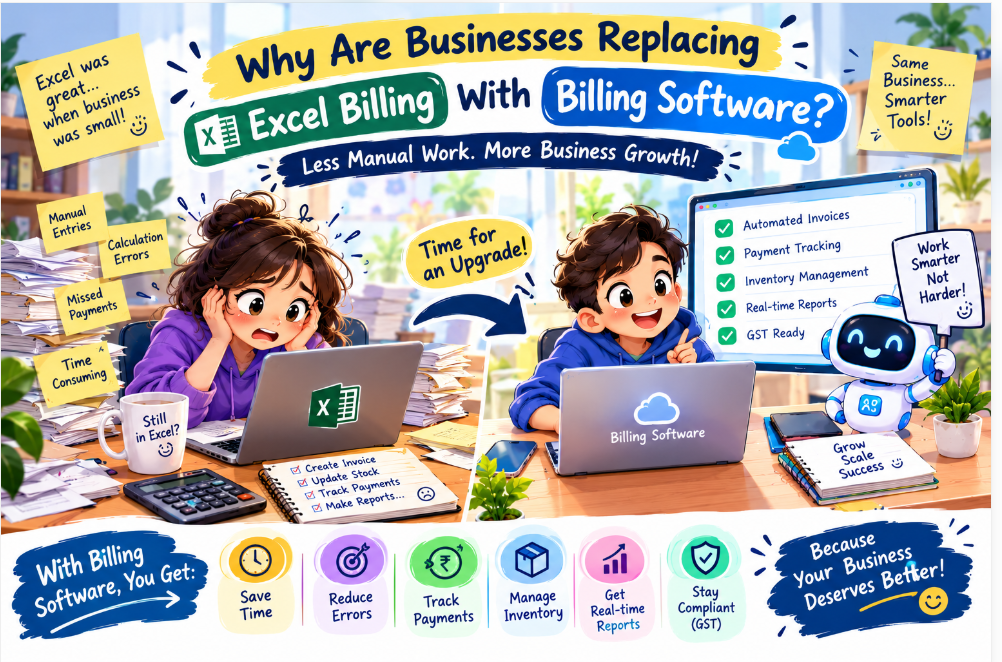
You may have to update several spreadsheets, correct calculation errors, search through old records, and contact customers about overdue payments. One employee might update a file while another works on an older version. A formula could accidentally be deleted, or an invoice might be recorded twice.
Suddenly, a tool that once saved time begins consuming it.
This is why many businesses are considering a transition from Excel-based billing to dedicated billing software.
The real question is not whether Excel is a good tool. Excel remains useful for calculations, data analysis, budgeting, and reporting. The question is whether a spreadsheet is still the most practical system for managing your entire billing process.
For businesses with increasing transaction volumes, multiple employees, inventory requirements, or more complex reporting needs, dedicated billing software can provide a more structured approach.
2. Excel Billing vs Billing Software: What Is the Difference?
Excel is a spreadsheet application that allows users to organise information, create formulas, and build customised billing templates. Billing software, on the other hand, is designed specifically to manage invoicing and related business activities.
Consider a simple example.
A wholesaler sells products to 50 customers. Each sale needs an invoice, the stock balance must be updated, and payments must be tracked. Using Excel, employees may need to enter the same information into different sheets or files.
With suitable billing software, the business may be able to generate invoices from saved product and customer records, update inventory automatically, record payments against invoices, and view outstanding balances from a central dashboard.
The exact features depend on the software selected, but the main advantage is integration: information entered once can often be reused across connected business functions.
Here are the key differences:
-
Invoice creation: Excel requires a template and formulas; billing software generally offers dedicated invoice-generation features.
-
Calculation: Excel depends on correctly configured formulas; billing software calculates totals and taxes using its configured rules.
-
Payment tracking: Excel may require manual updates; billing software can link payment entries to individual invoices.
-
Inventory: Excel can maintain stock sheets, but integration may require additional setup; billing software may connect billing and stock records.
-
Reporting: Excel reports often require filtering, formulas, or PivotTables; billing software may offer ready-made sales and outstanding-payment reports.
-
Team access: Shared spreadsheets require version and permission management; billing software may provide user accounts and role-based permissions.
Neither option is automatically right for every business. A freelancer issuing five invoices per month may be perfectly comfortable with Excel. A growing business with several employees and regular stock movement may benefit much more from specialised software.
3. The Hidden Cost of Managing Billing Manually
When business owners compare Excel with billing software, they often focus on the software price. However, they may overlook the time and effort spent maintaining spreadsheets.
Suppose an employee spends 45 minutes each working day preparing invoices, updating payment records, and correcting spreadsheet entries. Over 22 working days, that adds up to approximately 16.5 hours per month.
That is time that could potentially be spent following up with customers, preparing orders, or supporting other business activities.
The cost is not limited to employee time. Manual processes can also create problems such as:
Repeated data entry: Customer details, product information, and transaction amounts may need to be entered multiple times.
Calculation mistakes: Incorrect formulas, overwritten cells, or inconsistent tax settings can lead to inaccurate totals.
Delayed payment follow-ups: When outstanding invoices are scattered across files, it may be harder to identify which customers need reminders.
Difficulty finding old records: Searching through folders and spreadsheets becomes frustrating when records are not organised consistently.
Limited visibility: Owners may not have an immediate picture of total sales, unpaid invoices, or current stock levels.
These problems do not occur in every spreadsheet-based business. Well-designed spreadsheets can be reliable for simple tasks. However, as transaction volumes and operational complexity increase, maintaining manual processes may become less efficient.
4. Why Businesses Are Switching to Automated Billing
Faster invoice generation
Dedicated billing software can save customer details, product descriptions, prices, and tax configurations. Instead of rebuilding an invoice every time, an employee can select the relevant customer and products and generate the document using the available information.
For businesses that issue many invoices, this can reduce repetitive work.
Better payment tracking
Sending an invoice is only one part of the sales process. Businesses also need to know whether the customer has paid, made a partial payment, or still has an outstanding balance.
Billing software may provide invoice statuses, payment histories, and outstanding-payment reports. Some systems also support reminders or integrations with payment services.
These features help employees follow up more consistently, although actual payment speed still depends on customer behaviour and the business's payment terms.
More organised inventory management
For retailers, distributors, and wholesalers, billing is closely connected to stock.
If the selected software supports inventory integration, a sale can update the corresponding stock record. This helps employees identify products that are running low and reduces the need to update separate files manually.
Businesses should verify how stock adjustments, returns, damaged goods, and purchase entries are handled before choosing a solution.
Easier access to business reports
Business owners need more than a list of invoices. They want to understand sales performance, customer balances, frequently sold products, and payment patterns.
Billing software may provide reports that help answer questions such as:
-
How much did we sell this month?
-
Which invoices remain unpaid?
-
Which products are selling most frequently?
-
How much stock is available?
-
Which customers have outstanding balances?
For more advanced analysis, businesses can export their records into Excel or connect them to a reporting tool such as Power BI, depending on the software's capabilities.
Better coordination between employees
When several employees manage billing, a central system can reduce confusion about which file is current. User accounts and permissions can also help businesses control who can create, edit, approve, or view certain records.
This is especially useful when billing responsibilities are shared between sales teams, accountants, store managers, and business owners.
5. Why Billing Software Matters for GST and E-Invoicing in India
For businesses operating in India, billing is not only about preparing a professional invoice. Depending on the business and applicable requirements, it may also involve GST details, invoice records, reconciliation, and electronic invoicing.
The GST e-invoicing system uses an Invoice Registration Portal to authenticate applicable invoices and generate an Invoice Reference Number (IRN) and a digitally signed QR code. The process is designed to support standardisation and reduce certain manual data-entry and reconciliation problems.
The GST Network explains the e-invoicing framework and its benefits on its official website: https://www.gstn.org.in/e-invoicing
The National Informatics Centre also provides an overview of the GST e-invoice system: https://www.nic.gov.in/project/gst-e-invoice/
Businesses should not assume that every digital invoice is automatically a legally registered e-invoice. E-invoicing requirements depend on the applicable rules, turnover criteria, exemptions, and transaction type. Businesses should verify their current obligations with a qualified tax professional or official GST resources.
When evaluating billing software, ask whether it supports the GST features your business actually needs. These might include configurable tax rates, credit notes, invoice numbering, reporting, and integration with an authorised Invoice Registration Portal where applicable.
The right software can make compliance-related workflows more organised, but software alone does not guarantee that a business is complying with every legal requirement. Correct configuration, accurate records, and appropriate professional advice remain important.
6. Is Billing Software Suitable for Every Business?
Billing software can support many types of businesses, but the ideal features depend on how the business operates.
Retail shops: May need barcode scanning, product catalogues, inventory tracking, discounts, and point-of-sale functionality.
Wholesalers and distributors: May need bulk invoicing, customer-specific prices, purchase records, credit tracking, and stock management.
Service-based businesses: May prioritise quotations, service descriptions, recurring invoices, payment tracking, and customer records.
Small manufacturers: May need inventory controls, raw-material records, product costing, and integration with production workflows.
Digital agencies and IT companies: May need project-based billing, milestone invoices, service packages, recurring payments, and expense tracking.
Growing multi-branch businesses: May require centralised reporting, location-wise sales records, multiple users, and controlled permissions.
Before purchasing software, list the activities your team performs every day. This helps you avoid paying for features you do not need while ensuring that essential workflows are covered.
7. How Much Does Billing Software Cost?
There is no single price that fits every business. The cost depends on the number of users, required features, deployment method, integrations, customisation, and ongoing support.
A basic billing application may cover invoice generation and customer records. A more advanced system might include inventory management, multiple branches, detailed reporting, payment integrations, or accounting functionality.
Businesses should consider the total cost of ownership rather than looking only at the initial purchase price.
Possible cost components include:
-
Subscription or software licence fees
-
Setup and configuration
-
Data migration from existing spreadsheets
-
Customisation and third-party integrations
-
Staff training
-
Maintenance, upgrades, and technical support
-
Backup, security, or hosting costs, where applicable
For example, a small shop with one billing counter may need a simple off-the-shelf solution. A distributor with several locations and specialised approval processes may require more configuration and integration.
The best approach is to request a clear quotation based on your actual requirements. Compare what is included, what costs extra, how data can be exported, and whether support is available when your team needs help.
Do not assume that the most expensive solution is automatically the best. Choose software that solves your current problems and can accommodate reasonable future growth.
8. Why Billing Software Is Becoming More Connected to AI and Automation
Business software is evolving beyond basic record-keeping. Many organisations are exploring automation to reduce repetitive work and make information easier to use.
In billing workflows, suitable automation may help with tasks such as:
-
Generating invoices from approved orders or service records
-
Sending payment reminders based on due dates
-
Organising invoice documents
-
Flagging duplicate entries for review
-
Summarising outstanding balances
-
Preparing routine sales reports
-
Connecting billing records with customer relationship management systems
AI can also assist with tasks such as extracting information from documents or summarising financial records, provided the tools are configured appropriately and the results are checked.
However, businesses should be careful about giving automated systems unrestricted access to sensitive financial information. Permissions, audit logs, data protection, and human approval are important considerations, especially for payments, tax-related actions, and changes to customer records.
Automation should reduce unnecessary manual effort without removing the checks that protect the business.
A practical starting point is to identify one repetitive task, estimate how much time it consumes, and evaluate whether a billing system or integration can handle it reliably.
9. How to Choose the Right Billing Software
Before making a decision, ask yourself the following questions.
1. What is slowing down our current billing process?
Identify the biggest problems first. These could include slow invoice creation, missed payment follow-ups, stock errors, or difficulty preparing reports.
2. How many invoices do we create?
Consider daily and monthly volumes, seasonal peaks, and expected growth.
3. Do we need inventory management?
If your business sells physical products, determine whether stock tracking should be integrated with billing.
4. Which tax and invoicing features are required?
Confirm the relevant requirements for your business and check that the software supports them.
5. Can we import our existing data?
Ask whether customer records, product lists, opening balances, and historical invoices can be migrated from Excel.
6. What security controls are available?
Look for suitable user permissions, secure authentication, backups, and an understandable data-export process.
7. Will the system work with our other tools?
Check whether it integrates with your accounting software, payment services, e-commerce platform, or reporting tools.
8. What happens if we need help?
Ask about onboarding, training, support hours, updates, and the process for reporting technical problems.
9. Can we test it before committing?
A demonstration or trial can help employees evaluate whether the software suits their everyday workflow.
10. What will the total cost be?
Request a breakdown of setup, subscription, customisation, support, and any usage-based charges.
A structured evaluation is more useful than choosing software simply because another business uses it.
10. Why Delhi Is a Great Hub for AI and Business Software Development
Delhi and the wider National Capital Region (NCR) offer access to a broad business ecosystem, including retailers, manufacturers, service providers, startups, educational institutions, and established enterprises.
This creates opportunities for technology companies to work with organisations that have different operational needs. A retail shop may need faster point-of-sale billing, while a distributor may need inventory integration and a service company may want automated invoicing and payment reminders.
The region also has access to technology professionals, training institutions, business networks, and startup communities. For organisations seeking software development or automation services, this can make it easier to explore solutions suited to their operations.
However, location alone does not guarantee software quality. Businesses should evaluate a technology partner based on its understanding of the problem, technical capabilities, communication, security practices, support arrangements, and ability to deliver the agreed scope.
The goal should be to find a partner that understands both the technology and the business process behind it.
11. What We Offer at Innovative AI Solutions and Coding Hub
At Innovative AI Solutions, we understand that businesses need technology that solves practical problems rather than adding unnecessary complexity.
Our work covers digital solutions that can help organisations improve their online presence, streamline processes, and support business growth.
Billing software: Solutions designed around invoicing, billing workflows, customer records, and relevant operational requirements.
Website development: Business websites that help companies present their services, build credibility, and connect with customers online.
Application development: Web and mobile applications designed around specific business requirements.
AI automation: Automation opportunities for repetitive tasks, information processing, reporting, and connected workflows, where appropriate.
Business process integration: Connecting suitable systems so teams can reduce duplicate data entry and work with more organised information.
Every business has different requirements. Some may only need a reliable billing solution, while others may benefit from connecting billing with inventory, customer management, or reporting.
Our approach is to understand the existing workflow, identify the main challenges, and recommend a practical solution based on the business's needs and budget.
Alongside these services, Coding Hub focuses on technology learning and helping students build practical skills in areas such as programming, data analytics, and AI-related technologies.
Explore our website to learn more about our work and available solutions: https://codingnowai.in/
If your business still relies heavily on manual billing, begin by reviewing which tasks consume the most time and where errors occur. That simple assessment can help you decide whether a dedicated billing system would be a worthwhile next step.
12. Frequently Asked Questions
Q1. Why are businesses replacing Excel billing with billing software?
Businesses often make the transition when spreadsheets become difficult to maintain as transaction volumes grow. Dedicated billing software can streamline invoice generation, payment tracking, inventory management, and reporting.
Q2. Is Excel bad for billing?
No. Excel is useful for simple billing needs, calculations, and customised reports. It may be sufficient for freelancers or businesses with a small number of invoices. The decision depends on complexity, volume, and the need for automation.
Q3. Is billing software worth it for small businesses?
It can be worthwhile if it saves enough time, reduces avoidable errors, or simplifies important workflows. Small businesses should compare the cost with the practical benefits and choose a solution that fits their requirements.
Q4. Can billing software manage GST invoices?
Many billing applications support GST-related invoice fields and reports, but features vary. Businesses should confirm the relevant capabilities and check whether additional e-invoice integration is required for their circumstances.
Q5. Can billing software track payments automatically?
Some systems can record payments through integrations or update invoice statuses based on connected payment information. Other systems require manual confirmation. Check the exact features before purchasing.
Q6. Can I move my existing Excel billing data into software?
Many systems support importing customer lists, product records, or transaction data. Historical invoice migration may require additional preparation, so ask the provider about supported formats and data validation.
Q7. Is cloud billing software better than desktop software?
Cloud software may offer remote access and easier collaboration, while desktop systems may suit businesses that prefer local operation. The right choice depends on internet availability, security requirements, integrations, backup arrangements, and working practices.
Q8. Does billing software eliminate all billing errors?
No. It can reduce certain manual errors, but incorrect product data, tax settings, user entries, and configuration problems can still cause mistakes. Regular checks and appropriate controls remain necessary.
Q9. Can billing software connect with AI automation?
Depending on the software, APIs or integrations may enable automated reminders, report preparation, document processing, or other workflows. Any automation involving financial decisions or sensitive data should have suitable permissions and review procedures.
Q10. How do I choose the best billing software for my business?
Start by listing your billing, inventory, reporting, compliance, and integration needs. Compare total costs, ease of use, support, data portability, and security. Test the software with realistic business scenarios before committing.
13. Quick FAQs: A Few More Things to Know
Can billing software help a growing business?
Yes, if it supports the business's increasing transaction volume, users, reporting needs, and operational complexity.
Should I stop using Excel completely?
Not necessarily. Excel can remain useful for analysis, budgeting, and specialised reports even after billing operations move to dedicated software.
What is the first step towards billing automation?
Document your current process, identify repetitive tasks, and determine which activities would benefit most from automation.
Is custom billing software always necessary?
No. Many businesses can use existing products. Custom development is worth considering when standard software cannot reasonably meet important workflow or integration requirements.
Final Thoughts: Spend Less Time on Billing and More Time Growing Your Business
Excel has earned its place in business because it is flexible and familiar. But as operations grow, maintaining billing through spreadsheets can become increasingly demanding.
Dedicated billing software can help businesses organise invoices, track outstanding payments, manage inventory, prepare reports, and connect routine tasks. The right solution can improve visibility and free employees to focus on customers and business development.
The key is not to adopt technology simply because it is new. It is to choose technology that solves a real problem, fits your budget, and supports the way your business operates.
At Innovative AI Solutions, we believe that technology should make everyday business processes simpler, more connected, and more manageable. With Coding Hub supporting practical technology learning, our broader goal is to help businesses and learners understand how digital tools can create meaningful value.
Business aapka, technology hamari — let technology handle the repetitive work while you focus on growing your business.
Learn more about our solutions at https://codingnowai.in/ and explore how the right technology can support your next stage of growth.