The Big Question
Here's a question every fresher asks: If I have no experience, what do I show on GitHub?
The honest answer: You show your thinking, not just your code.
Recruiters know you don't have professional projects. They're not looking for a perfect production app. They're looking for signals—evidence that you can learn, build, and finish what you start.
Most freshers make the same mistake. They upload fifty tutorial projects. They fork repositories they never touched. They push code with no README, no context, no explanation.
And then they wonder why nobody calls.
The freshers who get hired do something different. They treat GitHub as a portfolio, not a dumping ground. They curate. They document. They show the why behind the what .
Let's build that.
What Recruiters Actually Look For
Before building anything, understand what hiring managers check when they open your GitHub .
For Technical Roles:
-
Real projects (not just tutorials)
-
Code quality and structure
-
Commit history (consistent, meaningful messages)
-
README clarity (can they understand your project in 30 seconds?)
-
Problem-solving approach
For HR (Non-Technical):
-
Profile polish
-
Project activity
-
Overall presentation
The reality: a recruiter might spend less than one minute on your profile . Your first impression is your pinned repositories and profile README. Make them count.
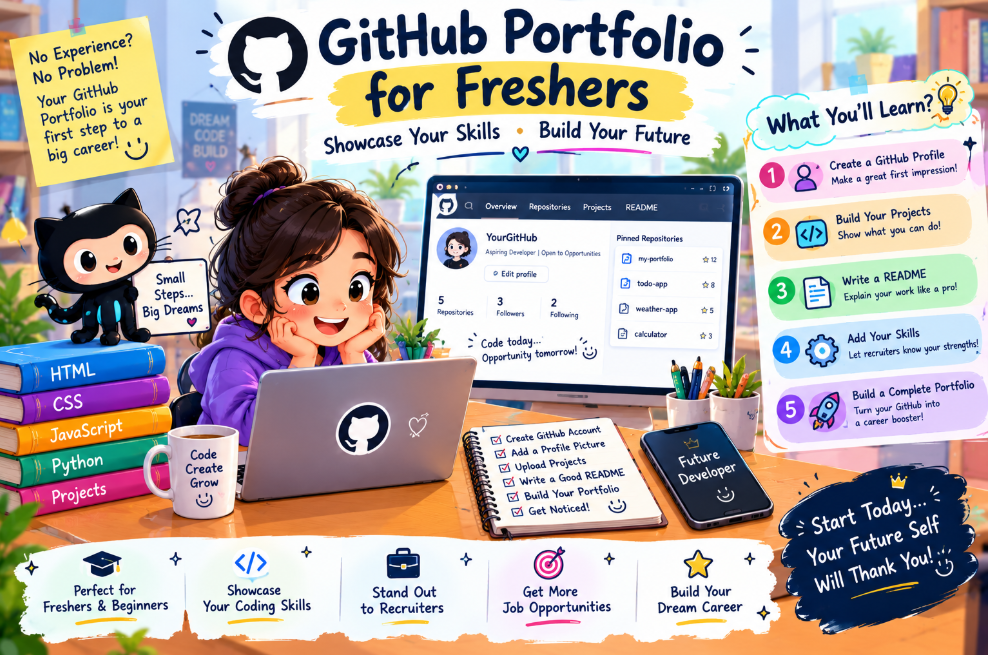
Step 1: Create a Professional Profile README
Your profile README appears at the top of your GitHub profile. It's your introduction, your elevator pitch, your digital handshake .
How to Create It:
-
Go to GitHub and create a new repository
-
Name it exactly your username (e.g.,
yourname/yourname) -
Make it Public
-
Check "Add a README file"
-
Click Create repository
GitHub will recognize it as special and display it on your profile .
What to Include:
-
Introduction: Who you are and what you're looking for
-
Skills: Technologies you're learning or comfortable with
-
Current Projects: What you're building now
-
Connect: LinkedIn, email, portfolio site
Template to Start:
# Hi there, I'm [Your Name] 👋 ## About Me - 🎓 Recent [degree] graduate specializing in [your focus] - 🌱 Currently learning [technology] - 💼 Looking for [role type] opportunities - 📍 Based in [location] ## 🛠️ Tech Stack    ## 📊 GitHub Stats  ## 🔗 Connect [LinkedIn](link) | [Email](mailto)
Use shields.io for badges and github-readme-stats for dynamic stats .
Step 2: Curate Your Best Projects
This is where most freshers fail. They pin everything. Or they pin nothing. Both are wrong.
The Rule: Pin 3-5 projects that represent your best work .
Not your most complex. Not your most recent. Your best.
What Makes a Project "Pinnable"?
-
It solves a real problem (even a small one)
-
It has a clear README
-
It's complete (not abandoned mid-build)
-
It shows skills relevant to the role you want
-
It's deployed (if possible)
What to Avoid Pinning:
-
Tutorial follow-alongs
-
Forked repositories you didn't modify
-
Half-finished experiments
-
Code without documentation
Real Talk: One solid, working project is worth more than ten unfinished ones .
Step 3: Write READMEs That Actually Get Read
Your README is your project's cover letter. A bad README kills a great project because nobody understands it .
Every README Needs:
-
Project title and one-sentence description
-
The problem it solves (context matters)
-
Technologies used
-
Setup instructions (can someone run it in 10 minutes?)
-
Screenshots or GIFs (show it working)
-
What you learned or challenges faced
What Most Freshers Miss:
Recruiters don't just want to know what you built. They want to know how you think.
Instead of: "I built an auth service."
Write: "I designed a multi-client auth concept with JWT rotation, aimed for p95 login under 400ms, added MFA fallback, and planned a blue-green rollout."
See the difference? One describes a feature. The other shows decision-making.
Template Structure:
# Project Name ## What It Does One paragraph explaining the problem and solution. ## Tech Stack - Frontend: React - Backend: Node.js - Database: PostgreSQL ## Setup 1. Clone the repo 2. Install dependencies: `npm install` 3. Run: `npm start` ## Screenshots  ## What I Learned - Challenge 1 and how I solved it - Challenge 2 and tradeoffs made
Step 4: Build Projects That Stand Out
You don't need to build the next Facebook. You need to build something real.
For Beginners, Start Local :
Don't chase Silicon Valley use cases. Build for problems you understand.
-
A demand forecasting tool for your local kirana store
-
A seasonal spike predictor for a stationery shop during school reopening
-
A simple expense tracker for your family
"Local problems build real intuition."
If You're Interested in AI/ML, Here Are 5 Portfolio Projects That Work :
-
RAG Application: Build an AI search assistant that answers questions from documents using embeddings and vector databases
-
Open Source Contribution: Contribute to frameworks like Hugging Face Transformers—even documentation helps
-
AI Agents Showcase: Build multi-agent workflows for task automation
-
Fine-Tuned LLM App: Train a model and wrap it in a UI
-
Real-Time Object Detection: Use YOLO and build a deployable demo
These projects use tools hiring teams actually care about .
General Project Ideas by Difficulty :
-
Beginner: To-Do App, Notes App, Weather App (API integration)
-
Intermediate: Chat System, Budget Tracker, Issue Tracker
-
Advanced: Full-Stack E-commerce, AI-powered tools, System design projects
Pick 3-5. Make them polished. Deploy them. Document them .
Step 5: Show Consistent Activity (Without Burning Out)
Your contribution graph is a visual resume. It shows commitment .
But here's the truth: You don't need daily commits. You don't need to fake activity .
What matters:
-
Meaningful commits: "Add login button" not "stuff"
-
Consistent presence: Don't disappear for months
-
Logical progression: Each commit represents a unit of work
Commit Message Examples:
-
❌ "fixed bug"
-
✅ "Fix authentication timeout on mobile devices"
-
❌ "update"
-
✅ "Add pagination to user list component"
Small, focused commits tell a story. Your commit history shows how you think .
Step 6: Contribute to Open Source (Optional but Powerful)
Open source contributions show collaboration skills and real-world experience .
Start Small:
-
Look for issues tagged "good first issue" or "help wanted"
-
Start with documentation, error messages, or broken links
-
Fix a small bug or add examples
Even one merged pull request signals that you can work with others, follow standards, and contribute meaningfully .
Step 7: Deploy Your Projects
A live demo changes everything. Recruiters can see your work instead of guessing .
Free Hosting Options:
-
Vercel or Netlify for frontend projects
-
GitHub Pages for static sites
-
Render or Railway for full-stack apps
-
Streamlit Cloud for data/AI demos
Add the live link to your README with [Live Demo](link) .
Cost Based on Website Type
If you're building projects to showcase, here's what hosting and tools typically cost.
Personal Projects ($0/month): GitHub free tier, Vercel/Netlify free tier, GitHub Pages. Everything you need to start is free.
Portfolio Website ($0 - $20/month): Custom domain ($10-15/year), hosting free tier or minimal paid tier. A personal site adds professionalism.
Full-Stack Projects ($0 - $25/month): Free tiers for most services. Database hosting (Supabase, PlanetScale free tiers) and API services may have costs at scale.
AI/ML Projects ($10 - $50/month): GPU access for training (Colab free tier, or paid cloud GPUs). Vector databases often have free tiers. Costs scale with usage.
The reality: freshers can build an impressive portfolio for $0. The investment is time, not money.
Breakdown by Developer Type (2020 - 2026 Rates)
This section applies if you're hiring developers, but understanding what employers expect helps you position yourself.
2020-2022: GitHub profiles were a bonus. Most freshers were hired on resumes and degrees.
2023-2024: GitHub became expected. Recruiters started checking profiles. Tutorial projects flooded the market.
2025-2026: Quality over quantity. Employers want to see thinking, not just code. AI can write boilerplate—humans need to show judgment .
What This Means for You:
-
Tutorials alone won't cut it
-
Original projects that solve real problems stand out
-
Documentation and decision-making matter as much as code
Why Prices Changed in 2026
The job market for freshers has shifted. Here's what changed:
AI Writes Code Now
"AI can ship a CRUD in minutes. It can't feel the user's pain, weigh constraints, or make trade-offs with limited time and budget. You can."
Resumes Are Flooded
"People are using AI-powered tools to mass apply, so hiring managers are flooded with résumés."
GitHub Is the Differentiator
Your profile is proof that you can actually build things. Courses show interest. Projects show proof. Proof gets interviews .
Pro Tips to Save Money in 2026
1. Start Free
Everything you need—GitHub, hosting, tools—has a free tier. Don't pay until you have to.
2. Use Student Packs
GitHub Student Developer Pack offers free credits, tools, and services.
3. Deploy Early, Deploy Often
Free hosting tiers are generous. Deploy as you build, not after.
4. Leverage Open Source
Use free, open-source tools and frameworks. They're what employers use anyway.
5. Don't Buy Courses You Don't Finish
Free resources are abundant. Pick one path and stick to it.
6. Document as You Go
Writing READMEs and explanations costs nothing but makes everything more valuable .
Questions to Ask Before Hiring (For Employers)
If you're evaluating fresher candidates, ask these questions.
"Walk me through a project on your GitHub."
This reveals whether they understand their own code or just copied tutorials.
"What was the hardest bug you fixed?"
Tests problem-solving and persistence.
"Why did you choose this technology?"
Shows decision-making, not just tool usage .
"What would you do differently next time?"
Reveals self-awareness and growth mindset.
"How do you approach a problem you don't know how to solve?"
Tests learning ability, not current knowledge.
"Show me something you're proud of."
Passion matters. Freshers who love building will grow fast.
Why Delhi is a Great Hub for AI Development
Delhi NCR has become a center for tech talent and AI development—and that matters for freshers building careers.
Talent Density: Thousands of startups and premier institutions (IIT Delhi, IIIT Delhi) create a dense ecosystem of opportunities .
Cost Advantage: Building in India costs significantly less than in the US, creating more opportunities for local talent .
Local Problems, Real Solutions: "Don't chase Silicon Valley use cases. Go to your local kirana store. Build a demand forecasting model for atta, rice, or milk."
Global Standards: Indian engineering teams build for global markets, adopting international best practices.
Open Source Community: India has a growing open-source contributor base, with many beginner-friendly projects.
What We Offer
At CodingNowAI, we've spent five years building AI systems and helping developers grow.
For Freshers:
-
Internship Opportunities: Hands-on experience with real projects
-
Mentorship: Guidance from experienced engineers
-
Portfolio Review: Feedback on your GitHub profile and projects
For Employers:
-
Talent Pipeline: Access to vetted freshers with strong portfolios
-
Training Programs: Upskilling for junior developers
-
Project-Based Hiring: Evaluate candidates on real work, not resumes
We believe in proof of work. We know that a strong GitHub profile can open doors that resumes can't . We help freshers build that profile—and help companies find them.
Learn more at CodingNowAI.
Frequently Asked Questions
Do I really need a GitHub profile as a fresher?
Yes. "If you don't have a GitHub, you're invisible to half the jobs out there." It's expected for developer roles.
How many projects should I have?
Quality over quantity. "5-10 solid projects" is the sweet spot. "One solid, working project is worth more than 10 unfinished ones."
What if my projects are simple?
Simple is fine if it's documented and complete. "Even a simple calculator, timer app or to-do list is valuable if you built it yourself, documented it, and it shows progress."
Do I need a portfolio website too?
Not required, but helpful. "A well-structured portfolio can be one of your most powerful assets." GitHub alone is enough to start.
How often should I commit?
"Don't disappear for months." Consistent, meaningful commits matter more than daily activity .
Should I contribute to open source?
Optional but powerful. "Open source participation demonstrates both technical ability and collaborative skills."
What if I don't have any projects yet?
Start today. "A log analysis exercise from class, a completed CTF writeup, or a home lab configuration is enough to start."
How do I get started?
Visit CodingNowAI to explore resources and opportunities. Start with one project. Document it. Deploy it. The first conversation is free.
Frequently Asked Questions
What makes a GitHub profile stand out?
Pinned projects with clear READMEs, live demos, meaningful commit messages, and evidence of thinking .
Should I pin all my projects?
No. "Pin 3-5 repositories that reflect your skills." Choose your best work .
What's the most important part of a README?
The setup instructions and explanation of what you learned. "If someone can clone your repository and get it running in under 10 minutes, your README did its job!"
How do I show I can work in a team?
Open source contributions, pull requests, and clear commit history show collaboration .
What if I only know one language?
That's fine. Depth in one language is better than shallow knowledge of many. Build projects that showcase your strongest skill .
How long until I see results?
Months, not weeks. Consistent building and documenting compounds over time. Start now, improve continuously.
Can I get hired just from GitHub?
"GitHub won't get you a job alone, but a strong GitHub can open doors that resumes can't."
How do I get started?
Visit CodingNowAI to explore resources. Create your profile README. Upload one project. Add a clear README. Deploy it. The first conversation is free.
Your Work Speaks Louder Than Your Resume
You're a fresher. You have no experience. But you have something more valuable: proof that you can build.
Your GitHub profile isn't about competing with senior developers. It's about showing that you're worth investing in—that you can learn, build, and finish what you start.
Start small. Build one project. Document it. Deploy it. Add another. The compounding begins immediately.
The freshers who get hired aren't the ones with the most impressive projects. They're the ones who show up, build consistently, and prove they can think.
Your profile is waiting to be built. What's stopping you?