Docker Explained: The Container Revolution That Changed Software Development
Docker is a platform that packages your application—and everything it needs to run—into a standardized unit called a container. These containers run the same way, every time, on any machine. No more "it works on my machine" excuses.
In this guide, we'll break down what Docker is, why it matters, how it works, and how you can get started—without getting lost in buzzwords.
What Exactly Is Docker?
Let's start with a clear definition.
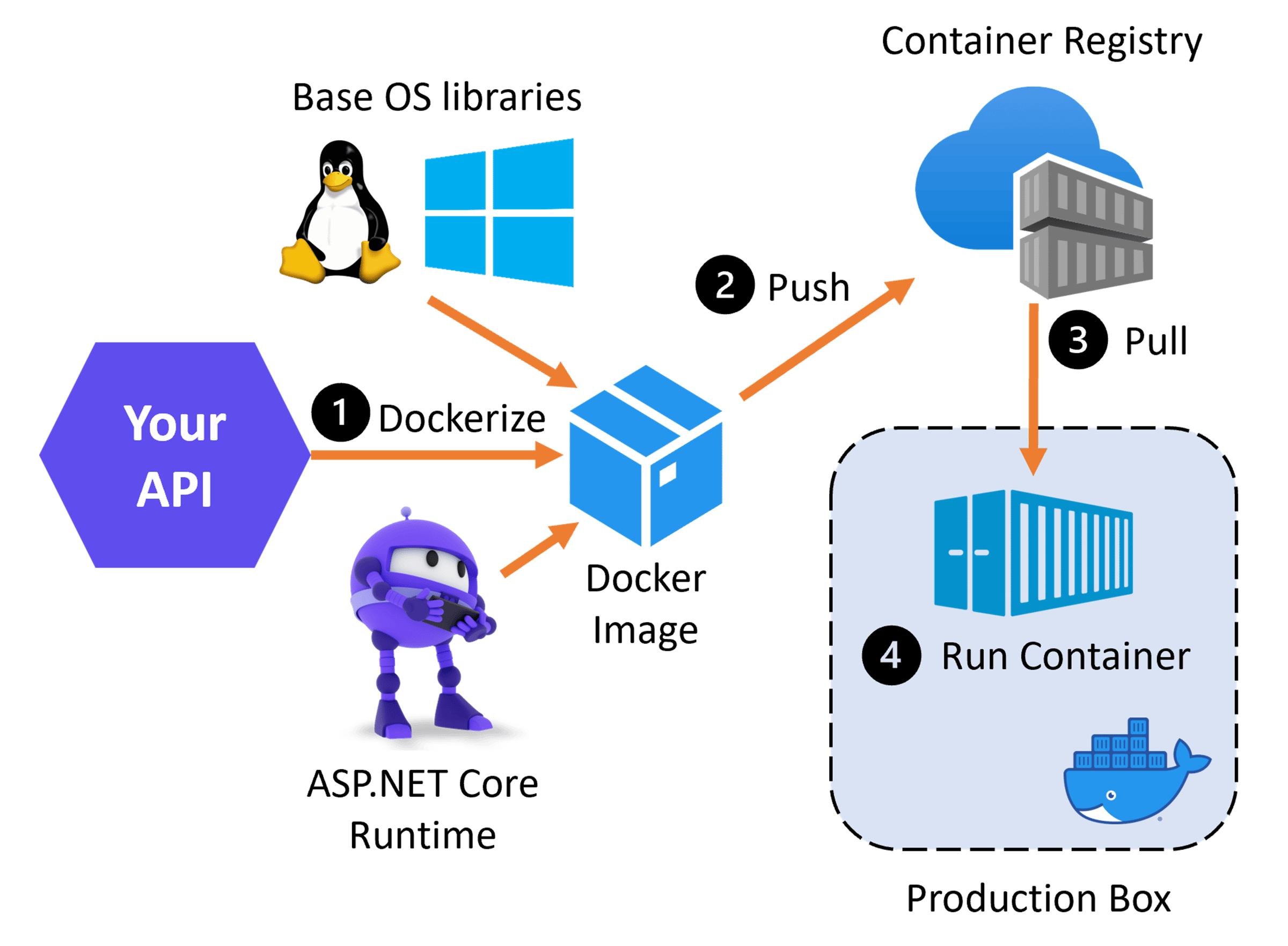
Docker is an open-source platform that automates the deployment of applications inside lightweight, portable containers. A container is a standalone, executable package that includes everything needed to run the software: code, runtime, system tools, libraries, and settings.
The "It Works on My Machine" Problem
Before Docker, this was a constant headache:
Developer: "It works on my machine!"
Tester: "It crashes on mine!"
Operations: "It doesn't run in production!"
The problem? Different environments—different operating systems, different library versions, different configurations.
Docker solves this by bundling the application with its entire environment. The container runs identically on your laptop, your colleague's machine, your test server, and in production.
Containers vs. Virtual Machines: What's the Difference?
This is the most common question. Here's the short answer:
| Feature | Virtual Machines (VMs) | Containers (Docker) |
|---|---|---|
| What It Does | Emulates an entire computer (hardware + OS) | Packages an app and its dependencies |
| Size | Heavy (gigabytes—includes full OS) | Lightweight (megabytes—shares the host OS) |
| Startup Time | Minutes (boots the entire OS) | Milliseconds (starts the process) |
| Resource Usage | High (each VM uses dedicated resources) | Low (shares host kernel) |
| Isolation | Strong (full hardware isolation) | Moderate (process-level isolation) |
| Portability | Limited (depends on hypervisor) | Excellent (runs anywhere Docker runs) |
The Analogy
Think of it like this:
-
Virtual Machines: Each application gets its own house with its own foundation, plumbing, and electricity. Very separate, very secure, but expensive to build and maintain.
-
Containers: Each application gets its own apartment in the same building. They share the building's foundation, plumbing, and electricity, but each has its own walls and furnishings. Much cheaper, faster to set up, and still isolated enough.
How Does Docker Work? (The Key Components)
Docker has four main components that work together.
1. Docker Engine (The Runtime)
This is the core of Docker. It's a client-server application that:
-
Daemon (
dockerd): A background service that manages containers, images, and networks. -
REST API: An interface that allows other programs to communicate with the Docker daemon.
-
CLI (
docker): The command-line tool you use to interact with Docker (e.g.,docker run,docker build,docker ps).
2. Docker Images (The Blueprint)
A Docker image is a read-only template with instructions for creating a container. Think of it as a recipe or a blueprint.
-
You can create an image from scratch or base it on an existing image (e.g.,
python:3.9-slim,ubuntu:22.04). -
Images are stored in registries—like Docker Hub (public), Amazon ECR, or Google Container Registry.
Key Insight: Images are the recipe. Containers are the cake.
3. Docker Containers (The Running Instance)
A Docker container is a running instance of an image. It's the actual running environment.
-
You can start, stop, restart, and delete containers.
-
Each container is isolated and has its own filesystem, network, and process space.
4. Dockerfile (The Build Instructions)
A Dockerfile is a text file that contains instructions on how to build a Docker image.
Example Dockerfile:
# Base image with Python
FROM python:3.9-slim

# Set working directory
WORKDIR /app

# Copy requirements and install dependencies
COPY requirements.txt .
RUN pip install -r requirements.txt

# Copy the rest of the application
COPY . .

# Command to run the application
CMD ["python", "app.py"]
5. Docker Compose (Multi-Container Management)
Docker Compose is a tool for defining and running multi-container applications. Instead of running each container separately with complex commands, you define everything in a docker-compose.yml file.
Example docker-compose.yml:
version: '3'
services:
  web:
    build: .
    ports:
      - "5000:5000"
  database:
    image: postgres:15
    environment:
      POSTGRES_PASSWORD: secret
    volumes:
      - postgres_data:/var/lib/postgresql/data
volumes:
  postgres_data:
This defines a web app container and a PostgreSQL database container that work together. One command (docker-compose up) starts everything.
Why Docker Matters: The Benefits
1. Portability
Write once, run anywhere. Docker containers run the same on your laptop, your CI/CD server, staging, and production. This dramatically reduces environment-related bugs.
2. Consistency
Docker ensures your application runs the same way every time, in every environment. No more "works on my machine" .
3. Efficiency
Containers are lightweight—they share the host's OS kernel. This means you can run many more containers on the same hardware compared to VMs, saving infrastructure costs.
4. Isolation
Each container is isolated from others and from the host. This means you can run multiple applications (even with conflicting dependencies) on the same machine without conflicts.
5. Scalability
Containerized apps can be easily scaled horizontally—just spin up more containers. Orchestration tools like Kubernetes automate this at massive scale.
6. CI/CD Integration
Docker fits perfectly with modern CI/CD pipelines. You can build, test, and deploy containers as part of your automated workflow .
Common Docker Commands
Here are the essential commands every developer should know.
| Command | What It Does |
|---|---|
docker pull <image> |
Download an image from a registry |
docker images |
List downloaded images |
docker run <image> |
Create and start a container from an image |
docker ps |
List running containers |
docker ps -a |
List all containers (including stopped ones) |
docker stop <container> |
Stop a running container |
docker rm <container> |
Remove a stopped container |
docker rmi <image> |
Remove an image |
docker build -t <name> . |
Build an image from a Dockerfile |
docker logs <container> |
View logs from a container |
docker exec -it <container> bash |
Open a shell inside a running container |
docker-compose up -d |
Start all services defined in compose file (detached) |
docker-compose down |
Stop and remove all services |
A Simple Example: Containerizing a Python App
Let's walk through a complete example.
Step 1: Write a Simple Python App
Create app.py:
from flask import Flask
app = Flask(__name__)

@app.route('/')
def hello():
    return "Hello, Docker! 🐳"

if __name__ == '__main__':
    app.run(host='0.0.0.0', port=5000)
Create requirements.txt:
flask==2.3.2
Step 2: Create a Dockerfile
Create a file named Dockerfile (no extension):
FROM python:3.9-slim
WORKDIR /app
COPY requirements.txt .
RUN pip install --no-cache-dir -r requirements.txt
COPY app.py .
CMD ["python", "app.py"]
Step 3: Build the Image
docker build -t my-python-app .
Step 4: Run the Container
docker run -p 5000:5000 my-python-app
Open your browser to http://localhost:5000—you should see "Hello, Docker! 🐳"
Step 5: Stop the Container
Press Ctrl+C to stop the container.
Docker Best Practices
1. Use Official Images
Use official images from Docker Hub as your base (e.g., python:3.9-slim). They're well-maintained and secure.
2. Keep Images Small
-
Use lightweight base images (e.g.,
-slimor-alpinevariants). -
Combine
RUNcommands to reduce layers. -
Clean up package caches in the same
RUNstep.
3. Use .dockerignore
Create a .dockerignore file to exclude unnecessary files (like .git, __pycache__, local configs) from your image build.
4. Run Containers as Non-Root
Create a dedicated user inside the container to run your app instead of running as root.
5. Tag Images Meaningfully
Use descriptive tags (e.g., myapp:1.0.0, myapp:latest) and avoid using latest in production.
6. Use Environment Variables for Config
Don't hardcode settings. Use environment variables or config files mounted at runtime.
7. Use Docker Compose for Multi-Container Apps
Don't run complex applications manually—use Compose to define and run everything together.
The Ecosystem: Docker, Kubernetes, and More
| Tool | Purpose |
|---|---|
| Docker | Build and run containers (local development + single-node) |
| Docker Compose | Define and run multi-container applications |
| Kubernetes (K8s) | Orchestrates containers at scale (multiple nodes, self-healing, auto-scaling) |
| Docker Swarm | Docker's native container orchestration (simpler than K8s) |
| Portainer | Web UI for managing Docker containers and Swarm |
| Registries | Storing and distributing images (Docker Hub, Amazon ECR, Google Container Registry, Azure Container Registry) |
Common Misconceptions
1. "Docker is just for devs."
False. Docker is widely used in production, enabling predictable deployments, efficient resource usage, and simplified scaling .
2. "Containers aren't secure."
False when best practices are followed. Containers provide good isolation, but you must follow security practices (use official images, run as non-root, scan for vulnerabilities) .
3. "Docker is only for Linux apps."
False. Docker Desktop runs on Windows, macOS, and Linux. And while Linux containers are the most common, Windows containers are also supported .
4. "Docker replaces virtual machines."
False. Docker containers and VMs serve different purposes. In fact, many Docker containers are run inside VMs in production—a hybrid approach that offers the best of both worlds.
Final Thoughts
Docker has fundamentally changed how we build, ship, and run software. It solves the age-old problem of environment inconsistency, making development faster, deployment safer, and collaboration smoother.
As one expert puts it: "Docker isn't just for developers—it's for anyone involved in software delivery" .
Start small. Containerize a simple app. Experiment with Docker Compose. Then explore Kubernetes for orchestration. The skills you gain will serve you throughout your career.
Still have questions about Docker? Drop a comment below—we'd love to help. And if you're looking for a hands-on tutorial, let us know in the comments!
Quick Summary (TL;DR)
| What Is Docker? | A platform that packages applications and their dependencies into lightweight, portable containers. |
|---|---|
| Containers vs. VMs | Containers are lighter, faster, and more efficient because they share the host OS kernel rather than emulating the entire hardware. |
| Key Components | Docker Engine (runtime), Images (blueprints), Containers (running instances), Dockerfile (build instructions), Docker Compose (multi-container management). |
| Benefits | Portability, consistency, efficiency, isolation, scalability, and seamless CI/CD integration. |
| Best Practices | Use official images, keep images small, use .dockerignore, run as non-root, use environment variables for config. |
| The Golden Rule | "Write once, run anywhere." Docker ensures your application runs the same way in every environment. |
| Next Steps | Build a simple containerized app, try Docker Compose, then explore Kubernetes. |
Contact Us
Phone: +91 9667708830
Email: info@codingnow.in
Website: https://codingnowai.in/
Address:
2nd Floor, Kapil Vihar (Opp. Metro Pillar No.354)
Pitampura, New Delhi – 110034
Backlink to main website: Explore Python and AI courses at Coding Now – Gurukul of AI