AI Coding Assistants Compared: Finding the Right Tool for Your Workflow
Choosing an AI coding assistant in 2026 can feel overwhelming. The market has exploded, and tools have evolved from simple autocomplete into autonomous agents that can refactor entire codebases. The best choice is no longer about which tool is "best" overall—it's about which tool fits the way you work.
This guide breaks down the leading AI coding assistants to help you find the right fit for your workflow.
The Big Three: What Sets Them Apart
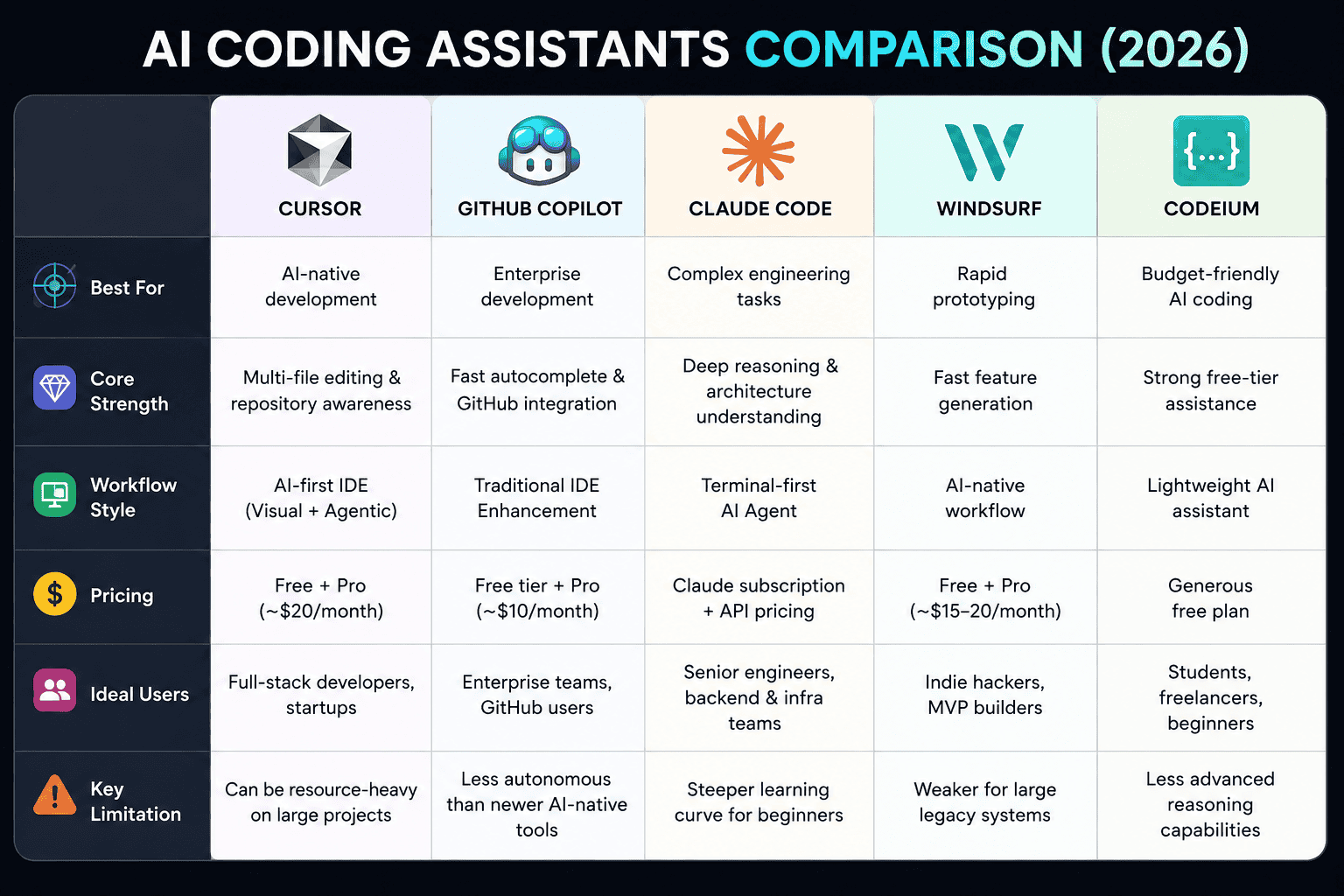
The market is currently defined by three distinct philosophies: IDE-Native (Cursor, Copilot), Terminal-First (Claude Code), and Enterprise-Ready (Gemini Code Assist, Tabnine).
1. GitHub Copilot: The Enterprise Default
Format: IDE extension (VS Code, JetBrains, Neovim)
Best For: Teams already embedded in the GitHub ecosystem
Copilot is the lowest-friction option. It integrates directly into the editors developers already use, offering real-time inline completions, chat assistance, and an agent mode that can autonomously respond to GitHub issues. Starting June 2026, Copilot transitioned to a token-based AI Credits system—code completions remain free, but premium model usage draws from a credit pool.
Pricing: Free tier (50 requests/mo); Pro $10/mo; Enterprise $60/mo effective (requires GitHub Enterprise Cloud).
2. Claude Code: The Terminal Agent for Complex Work
Format: Terminal CLI
Best For: Multi-file refactoring, deep codebase understanding, and architectural changes
Claude Code operates at the project level rather than line-by-line. It reads your codebase, plans a sequence of actions, executes them using real development tools, and evaluates results. Research from Factored found it ranked highest for usefulness, reliability, and code understanding among engineers.
Unlike IDE tools, Claude Code is terminal-first—it runs alongside your existing editor. It supports the Model Context Protocol (MCP) for integrating with 50+ external services, and its 1M token context window enables it to reason across massive codebases.
Pricing: Bundled with Claude Pro ($20/mo) or Max plans ($100–$200/mo); API pay-per-token also available. Across enterprise deployments, average spend is $150–$250/developer/month.
3. Cursor: The AI-First Editor
Format: Fork of VS Code
Best For: Daily IDE work with deep AI integration
Cursor replaces the VS Code editor entirely, with AI features as first-class citizens rather than bolt-on extensions. Its flagship Composer feature enables multi-file edits in a single pass, and the tool understands your entire codebase context. Auto mode routes tasks to the best available model without counting against credits, making costs more predictable. Cursor was the fastest-growing tool in this group, particularly among teams wanting AI-first workflows without leaving a VS Code environment.
Pricing: Free (Hobby); Pro $20/mo; Teams $40/user/mo; Ultra $200/mo.
Feature Comparison: At a Glance
| Feature | GitHub Copilot | Claude Code | Cursor |
|---|---|---|---|
| Format | IDE Extension | Terminal CLI | VS Code Fork |
| Real-time Completions | yes | no | yes |
| Multi-file Edits | Agent Mode | yes | Composer |
| Context Window | Moderate | 1M tokens | Large |
| MCP Support | (Agent Mode) | 50+ servers | yes |
| Multi-Agent Orchestration | no | Subagents | Limited |
| Best For | Team integration | Complex refactors | Daily IDE work |
Runner-Ups Worth Considering
-
Gemini Code Assist (Google) — Now a pure enterprise offering ($19–$45/user/mo) with deep Google Cloud integration and code customization from private repos. The individual/free tier ended June 2026.
-
Windsurf (Cognition) — An AI-native VS Code fork now owned by the Devin team, featuring the Cascade agent and AI-annotated code maps. Free and Pro tiers available.
-
Cline — The leading open-source option. It's free (you pay only for LLM API costs) and supports local models via Ollama, making it ideal for security-sensitive work. Plan/Act mode separates planning from execution.
-
Tabnine — Enterprise-only, with zero-code-retention and fully air-gapped on-premises deployment—the only tool suited to strict zero-data-retention requirements. Starts at $39/user/mo.
The True Cost of AI Coding Assistants
Headline prices don't tell the full story. Here's what to watch for:
Hidden Cost Layers
-
Token/credit exhaustion: Heavy agentic usage can exhaust monthly credits quickly. One developer reported a jump from $29 to $750/month after Copilot's billing transition.
-
Premium model usage: Most developers override to frontier reasoning models once they experience the quality difference—this accelerates token burn.
-
Enterprise governance: Organizations typically face $50,000–$250,000 in hidden annual costs from codebase indexing, compliance infrastructure, and enablement training.
Published Pricing Summary
| Tool | Individual | Team/Business | Enterprise |
|---|---|---|---|
| GitHub Copilot | $10–$100/mo | $19/user/mo | $60/user/mo effective |
| Cursor | $20–$200/mo | $40/user/mo | Custom |
| Claude Code | $20–$200/mo | $100/seat/mo | Custom |
| Gemini Code Assist | — | $19/user/mo | $45/user/mo |
| Tabnine | — | $39/user/mo+ | $59/user/mo+ |
How to Choose
| If you... | Choose |
|---|---|
| Live in GitHub and want the lowest friction | GitHub Copilot |
| Need multi-file refactors and deep codebase reasoning | Claude Code |
| Want an AI-first IDE for daily work | Cursor |
| Need privacy/on-premises deployment | Tabnine or Cline (local models) |
| Are already on Google Cloud | Gemini Code Assist |
| Want open-source flexibility and vendor independence | Cline |
The Reality Check: AI Assistants Still Need Humans
Despite the hype, current AI coding assistants still require a human in the loop. Benchmark research (RubberDuckBench) found that even the best-performing models (Grok 4 at 69.29%, Claude Opus 4 at 68.53%) only answered at most 2 questions completely correctly across all trials, and models hallucinated in 58.3% of responses on average.
A senior engineer is still essential for validation.
Final Thoughts
There is no single "best" AI coding assistant—the right choice depends entirely on your workflow. Most teams end up combining an IDE assistant (Copilot or Cursor) for daily work with a terminal agent (Claude Code) for major refactors.
The tools are moving fast. Start with a pilot in repetitive tasks or greenfield projects, measure the impact, and scale with proper governance. Every quarter spent evaluating rather than deploying is a quarter your competitors gain.
Contact Us
Phone: +91 9667708830
Email: info@codingnow.in
Website: https://codingnowai.in/
Address:
2nd Floor, Kapil Vihar (Opp. Metro Pillar No.354)
Pitampura, New Delhi – 110034
Backlink to main website: Explore Python and AI courses at Coding Now – Gurukul of AI